How to run DeepSeek-R1
As promised in the previous article, let us now look at how we can use the open model DeepSeek-R1 without relying on the Chinese company’s official website, but instead on our own computer or on a provider that runs the model for us.
We already saw that the Chinese model is enormous, with 671B parameters, 671 billion floating-point numbers, which means 1.342 GB of RAM, and that it is not possible to run a model of that size on our own computer.1 What we can download are distilled versions of small open-source models that the company itself has released. For example, DeepSeek-R1-Distill-Qwen-7B is a model created from Qwen-7B. It occupies around 4.7 GB on disk and can be run on a MacBook Air with 16 GB of RAM. There are similar models built from different open base models, such as DeepSeek-R1-Distill-Qwen-32B or the more powerful DeepSeek-R1-Distill-Llama-70B, based on the 70-billion-parameter Llama model.
The problem with these models is that, as we will see, they are much less capable than the large model. They are not able to solve even simple problems like the one we posed, combining several numbers to obtain a target number.
The alternative is to use a provider, a cloud service that hosts the model and runs it on its own computers. In a report by Artificial Analysis we can review the performance and price of the main providers that offer access to DeepSeek, such as Hyperbolic.xyz, together.ai, Fireworks.ai, or even the Chinese company’s own API.
In this article we will go step by step through how to install a small model on our own computer, run it locally, and also how to run DeepSeek-R1 through a provider. To run a local model I will use my MacBook Air M3 with 16 GB of RAM, the terminal, and the Python llm library by Simon Willison. For the provider, I signed up for Fireworks.ai and I will use its API from a simple Python program.
How to run DeepSeek locally
There are several ways to run an LLM locally on a MacBook with an Apple chip, M1, M2, M3, or M4. The simplest is to use the LM Studio application, with which we can download and run different available models.
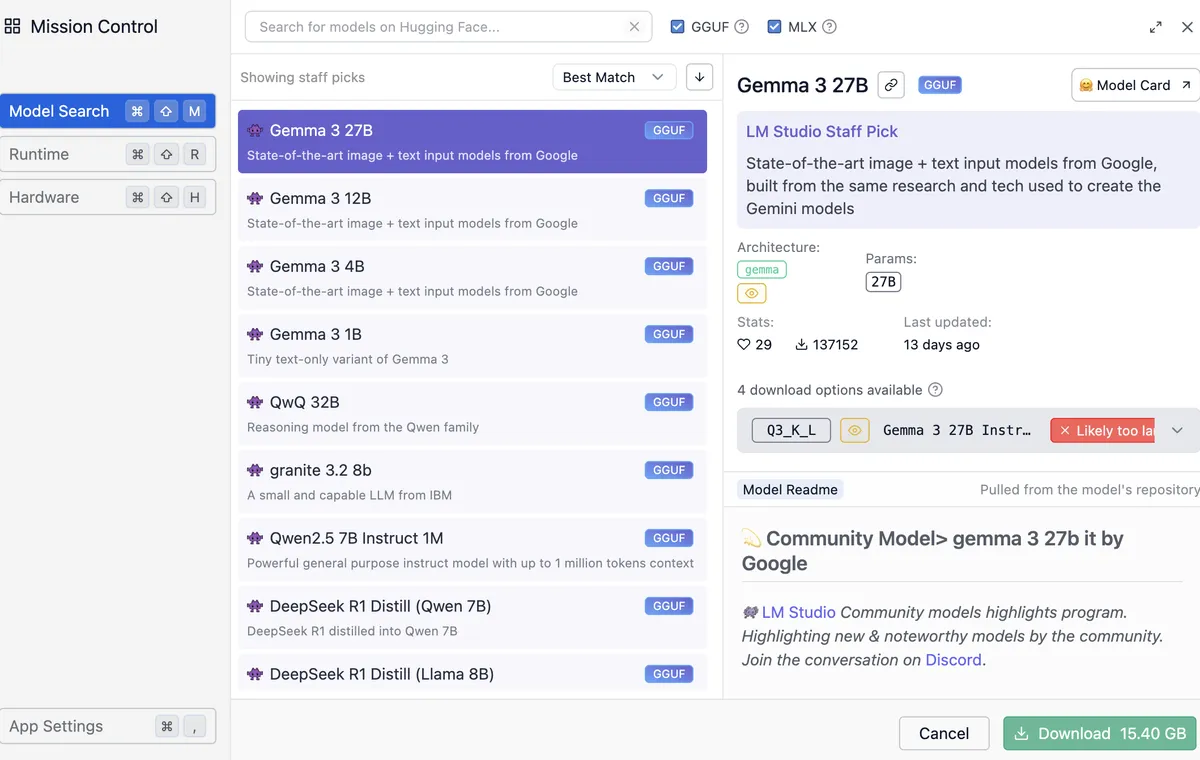
The application lets us search among the available models, we can select GGUF or MLX formats, different ways of packaging models to run them locally on the Mac, and it warns us if a model is too large for our computer. For example, in the following image the Google Gemma 3 27B model is selected. It uses 15.40 GB of memory and is too large to run on my 16 GB Mac.
Downloading DeepSeek with Simon Willison’s llm library
But instead of using that application, let us be a little braver and use the option preferred by true geeks: the command line, just like we did when computers booted into text mode and the mouse was optional. We will use Python and Simon Willison’s llm library.
Open the Terminal app, and the first thing we have to do is install Python. The simplest way to do it is with Homebrew. Run the following command in the terminal:
/bin/bash -c "$(curl -fsSL https://raw.githubusercontent.com/Homebrew/install/HEAD/install.sh)"
After that, you can use brew to install the packages we are interested in, such as Python:
~ $ brew install python
Once it is installed, check that both Python and pip, Python’s package installer, are working correctly:
~ $ python3 --version
Python 3.13.2
~ $ pip3 --version
pip 25.0 from ... (python 3.13)
It is a good idea to create a directory in which we keep all the Python programs related to the same project, together with all the libraries those programs need. We can create a dev directory to hold our programming projects, and inside it create an llm directory, we could use any other name, for the current project:
~ $ mkdir dev
~ $ cd dev
dev $ mkdir llm
dev $ cd llm
Once inside that directory, we activate a Python virtual environment and install the llm Python library:
llm $ python3 -m venv venv
llm $ source venv/bin/activate
llm (venv) $ pip3 install llm
This is the cleanest way to work with Python, so that the libraries of one project do not get mixed up with the libraries of another. Let us explain it briefly. In the current directory, a folder called venv has been created, llm/venv, where the libraries we download with pip will be stored. To use venv as the base directory for Python libraries, we have to “activate” it by running the activate command created inside it. At that point the prompt shows (venv), and any library will be installed inside the venv directory.
The llm library needs and installs many other packages. We can list them:
llm (venv) $ pip3 list
Package             Version
------------------- -----------
annotated-types     0.7.0
anyio               4.9.0
certifi             2025.1.31
charset-normalizer  3.4.1
click               8.1.8
...
Once the llm library is installed we can run the llm script to chat with a local model. But first we have to download one. To do that, we need to install the plugin that allows llm to work with models packaged in MLX format, an Apple format that lets LLMs run efficiently on its processors.
llm (venv) $ llm install llm-mlx
The available MLX models can be browsed in the MLX community on Hugging Face. Simon Willison also lists some of them in the explanation of the MLX plugin on GitHub. Let us download a small distilled DeepSeek-R1 model, mlx-community/DeepSeek-R1-Distill-Qwen-7B-8bit, which occupies 8.10 GB and uses 7.76 GB of memory.
llm (venv) $ llm mlx download-model mlx-community/DeepSeek-R1-Distill-Qwen-7B-8bit
Once it has been downloaded, we can finally run it with the -m option and the name of the model we just downloaded. We pass the prompt in quotes:
(venv) llm % llm -m mlx-community/DeepSeek-R1-Distill-Qwen-7B-8bit "What is 1+1?"
<think>
First, I identify that I am being asked to calculate 1 plus 1.

I know that when I add these two numbers, the result is 2.

Therefore, the correct answer is 2.
</think>

Sure, let us solve the sum step by step:

\[
1 + 1 = 2
\]

**Final answer:**
\[
\boxed{2}
\]
At last we can see the thought process and the answer of the reasoning model running locally.
We can confirm what we discussed in the previous article: DeepSeek-R1 was trained to first generate a step-by-step reasoning process between <think> tags and only then, once it reaches a conclusion, generate the answer.
Trying the downloaded model
Once downloaded, we can try the model on the problem from the previous article. Recall that the challenge was to find a way to operate on the numbers 2, 3, 6, and 120 to obtain 84. And recall as well that the reasoning needed to solve it was not complicated:
One way to get 84 from 120 is to subtract (120-84) from 120.
In other words, I need to subtract 36. Can I obtain 36 from 2, 3, and 6?
Yes, by multiplying them:
2*3*6=36. Then I already have the solution:

84 = 120-2*3*6
The full version of DeepSeek, the one on the Chinese website, did solve the problem perfectly, as shown in the image we saw in the previous article.
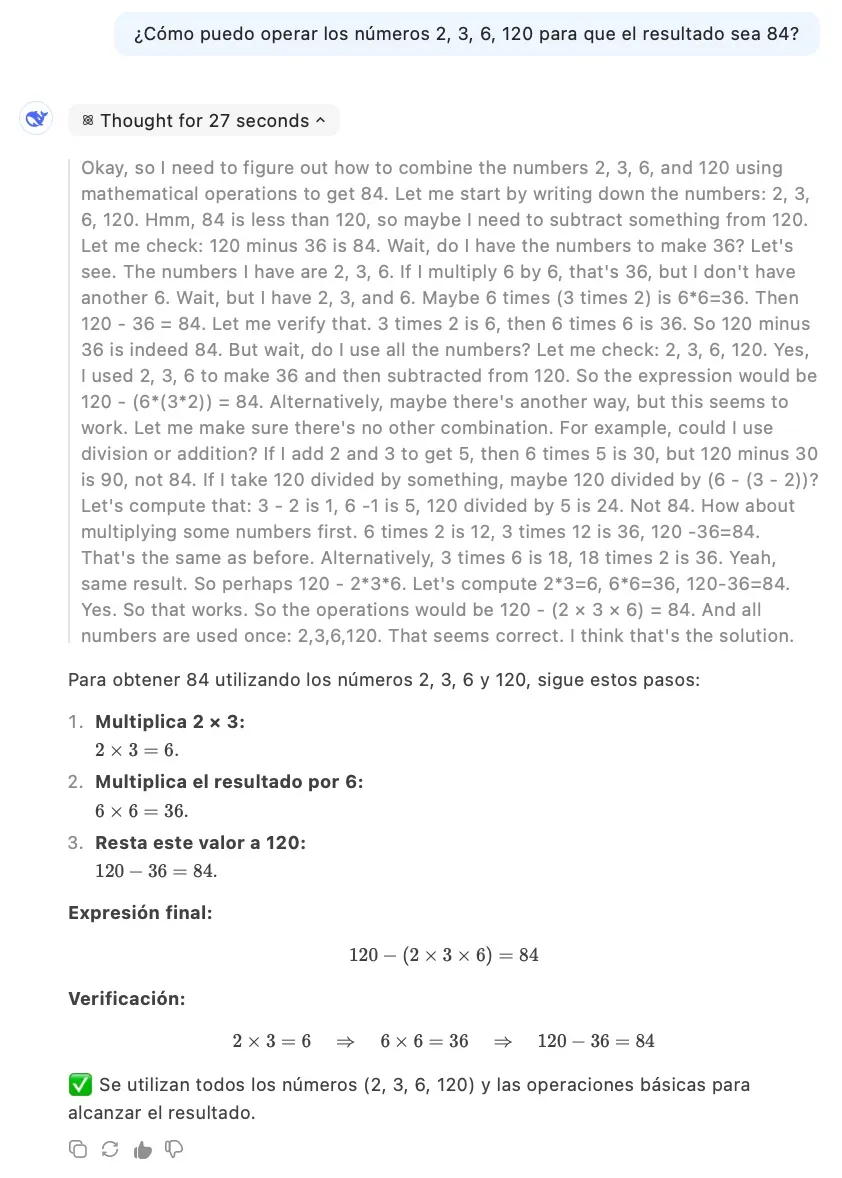
But there the full DeepSeek model was running, the one with 671B parameters. Does the model we downloaded, a 7B-parameter model, one hundred times smaller, do just as well? The answer is no. We can see it in the following transcript, where, after trying different alternatives, it never finds the correct one and ends up saying that no solution is possible:
(venv) llm % llm -m mlx-community/DeepSeek-R1-Distill-Qwen-7B-8bit "What operations can I
perform on the numbers 2, 3, 6, 120 so that the result is 84?"
<think>
First, I analyze the available numbers: 2, 3, 6, and 120. My goal is to operate
on them to obtain 84.

I consider the basic operations: addition, subtraction, multiplication, and division.
I also think about powers and roots if necessary.

I try combining 2, 3, and 6 in a way that, when used with 120, produces a result
close to 84. Multiplying 2 by 3 gives 6, and multiplying that result by 6 gives 36.
Then, I divide 120 by 36 and get approximately 3.333, which is not exact.

I review another combination: I divide 120 by 2, getting 60. Then I subtract 6 and 3 to
obtain 3, and subtracting those values from 60 gives me 57, which still does not reach 84.

Finally, I multiply 2 by 3 to get 6, add 6 to get 12, and then subtract that result
from 120, obtaining 108. However, 108 is not equal to 84.

After analyzing different combinations of multiplication and division, I identify
that the closest result is 84 by multiplying 2 by 3 by 6 and then dividing by 3.
</think>

To operate on the numbers **2, 3, 6**, and **120** in order to obtain **84**, follow these steps:

1. **Multiply 2 by 3:**
   \[
   2 \times 3 = 6
   \]

2. **Multiply the result by 6:**
   \[
   6 \times 6 = 36
   \]

3. **Divide 120 by the previous result:**
   \[
   120 \div 36 = 3.\overline{3}
   \]
   However, this result is not exactly 84. After reviewing different
   combinations, no operation is found that yields exactly 84 with
   the given numbers.

Therefore, with the numbers **2, 3, 6**, and **120**, it is impossible to obtain
exactly **84** using the basic operations of multiplication
and division.

\[
\boxed{\text{It is not possible to obtain exactly 84 with the numbers 2, 3, 6,
and 120 using basic operations.}}
\]
Since language models are stochastic models, other executions of the same prompt produce different results. But although I have tried several times, the correct solution never appears. Sometimes the model gets stuck in the thought process in endless loops and stops abruptly. Other times it ends with an incorrect solution. And at other times it says what we just saw: that it is not possible.
So even though we can download small models that have been taught using DeepSeek and that reason following the same strategy, these models are much less capable than the original model. So how do we run the large model without going through the official Chinese website? That is what we will see next.
How to run DeepSeek through a provider
Of all the providers I chose Fireworks. Not for any special reason. I looked at its website and everything seemed fine to me. It is all fairly well documented and it has the latest models available.
You need to sign up, register your card, and buy some credits. The minimum amount is USD 5. With that amount you can do quite a few queries. On the pricing page you can see that one million tokens cost USD 3. In truth, it is not quite as cheap as people said. For example, compared with the price of OpenAI’s models, 1M tokens of o1 cost USD 15 and 1M tokens of o3-mini cost USD 1.10.
Once registered, you need to create an API key so that you can send requests and use it with whatever API client you choose. We have to save the value of the API key because, once created, it will not be shown again. We must not share that string of characters, because it is what identifies us when the price of the API requests is charged against our credits.
How do we send requests to the Fireworks API? We could use the same llm script from before by adding a plugin to access Fireworks models. But, to try out other ways of using these models, we are going to do it by writing a small Python program.
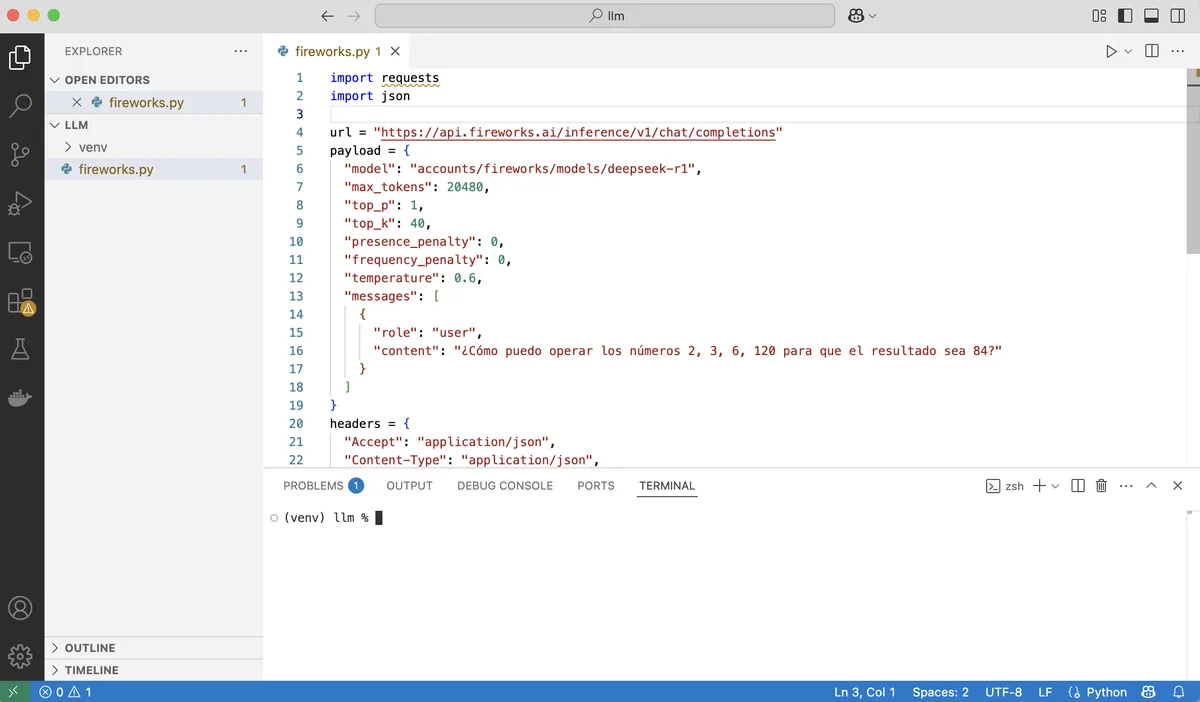
To write the program it is advisable to use an editor such as Visual Studio Code. Once installed, the most comfortable way to use it is with a setup like the one in the following figure. On the left, the file explorer panel opened in the folder we are working in; in the center, the editor panel with the program or programs we are working on; and below, a panel with an open terminal from which we can run those programs.
We need to install the Fireworks API package:
(venv) llm % pip install fireworks-ai
And then copy the example program from the Fireworks documentation, filling in the API key:
import requests
import json

url = "https://api.fireworks.ai/inference/v1/chat/completions"
payload = {
  "model": "accounts/fireworks/models/deepseek-r1",
  "max_tokens": 20480,
  "top_p": 1,
  "top_k": 40,
  "presence_penalty": 0,
  "frequency_penalty": 0,
  "temperature": 0.6,
  "messages": [
    {
      "role": "user",
      "content": "Hello, how are you?"
    }
  ]
}
headers = {
  "Accept": "application/json",
  "Content-Type": "application/json",
  "Authorization": "Bearer <API_KEY>"
}
response = requests.request("POST", url, headers=headers, data=json.dumps(payload))
print(response.text)
We call the program hello.py and run it in the terminal:
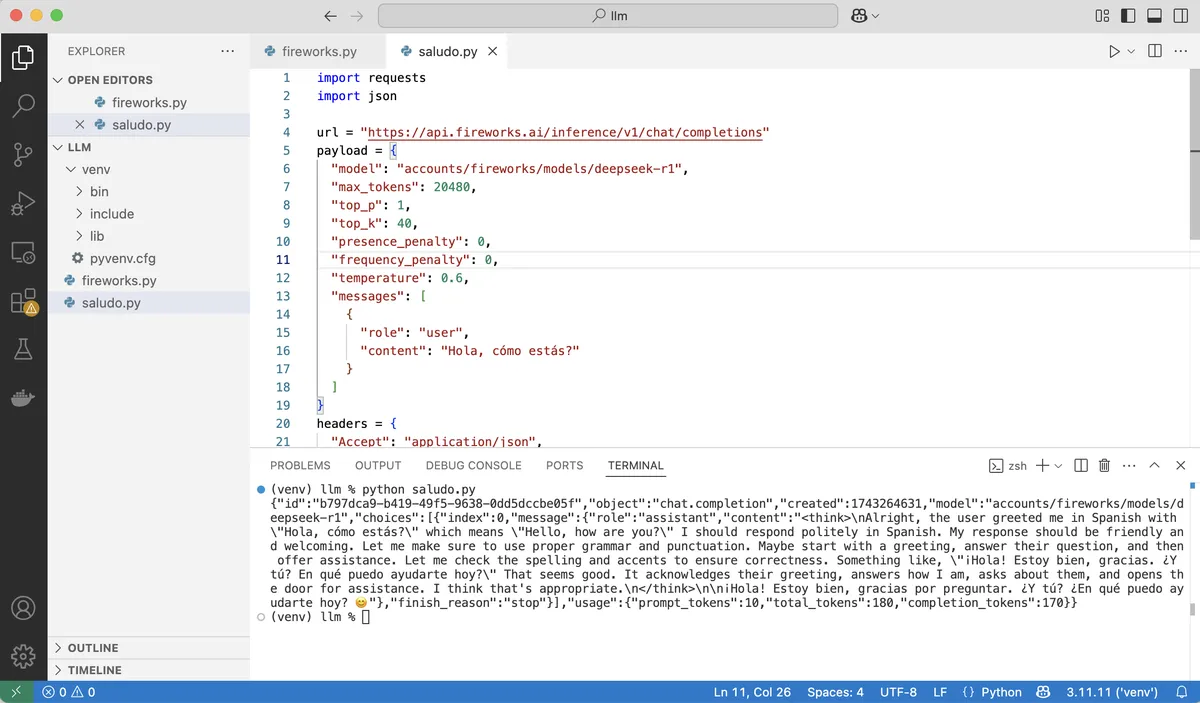
We have made a query to the DeepSeek-R1 model. We can see that the call works and that the API correctly returns the model’s answer. The response also includes the tokens consumed, in this case 180. If we go to the Home page of our account on Fireworks, we will see the credits we still have available. In this case, the same as before, because those 180 tokens represent a negligible amount and are not even charged.
We finish by changing the phrase "Hello, how are you?" to the original problem we have been posing to DeepSeek from the beginning: "What operations can I perform on the numbers 2, 3, 6, 120 so that the result is 84?" We can write the code in a new program, or simply replace the query in the current file, whichever we prefer. We run the script and, after waiting a little, it returns something like:
(venv) llm % python problem.py
{"id":"79fa6566-deb5-4fbe-83aa-7b45bf815dd4","object":"chat.completion","created":1743265311,
"model":"accounts/fireworks/models/deepseek-r1",
"choices":[{"index":0,"message":{"role":"assistant",
"content":"<think>\nOkay, let's see. I need to use the numbers 2, 3, 6, and 120 to get 84.
Hmm, maybe I can combine them with addition, subtraction, multiplication, division, or
exponents. Let me start by trying different combinations.\n\nFirst, 120 is a big number.
If I subtract something from 120, maybe that could work. Let me see: 120 minus 36
equals 84. But how can I get 36 from 2, 3, and 6? Well, 6 times 6 is 36, but I don't have
another 6. Wait, maybe 3 times 12? But how to get 12 from 2 and 6? 6 times 2 is 12. So,
3 times (6 times 2) is 36. Then 120 minus 36 is 84. Let me check that:\n\n
120 - (3 * 6 * 2) = 120 - 36 = 84. That works! But wait, did I use all the numbers?
The original numbers are 2, 3, 6, 120. In this case, I used 2, 3, 6, and 120. Yes, all of them.
So 120 minus (3 times 6 times 2) equals 84. Let me verify the multiplication order.
Multiplication is commutative, so 3*6*2 is 36. 120 minus 36 is indeed 84. \n\n
Alternatively, maybe there's another way. Let me think. If I divide 120 by something.
For example, 120 divided by (something) equals 84. But 120 divided by (10/7) is 84,
but getting 10/7 from 2, 3, and 6 seems tricky. Maybe not that approach.\n\n
Another idea: 6 times 14 is 84. How can I get 14 from 2, 3, and 120? 120 divided by 8.57...
which isn't helpful. Maybe subtract something from 6? 6*(120/(3+2))? Let's calculate
that: 3+2=5; 120/5=24; 6*24=144. That's too big. Not helpful.\n\n
Wait, going back to the first idea: 120 - (3*6*2) = 84. That uses all numbers once each.
That seems valid. Let me check again:\n\n3 multiplied by 6 is 18, multiplied by 2 is 36.
120 minus 36 is 84. Yes, that works. So the expression would be 120 - 3 * 6 * 2.
According to order of operations, multiplication comes before subtraction, so no
parentheses are needed if written as 120 - 3*6*2. But to make it clearer, maybe write it
as 120 - (3*6*2). Either way, the result is 84.\n\nI think that's a valid solution. Let me
see if there's another way. For example, using division. Suppose 6 divided by something.
6/(2/3) is 9, but I'm not sure how that helps. Or 120 - (6*3) + 2? 120 -18 +2=104. Nope.
Not helpful.\n</think>\n\nTo obtain 84 using the numbers 2, 3, 6, and 120, follow these steps:\n\n1. **Multiply 3 × 6 × 2**:\n
\\[\n   3 \\times 6 = 18 \\quad \\text{and then} \\quad 18 \\times 2 = 36\n   \\]\n2.
**Subtract the result from 120**:\n   \\[\n   120 - 36 = 84\n   \\]\n\n
**Final expression**:  \n\\[\n120 - (3 \\times 6 \\times 2) = 84\n\\]\n\n
**Answer**:  \n\\boxed{120 - 3 \\times 6 \\times 2 = 84}"},
"finish_reason":"stop"}],"usage":
{"prompt_tokens":30,"total_tokens":1038,"completion_tokens":1008}}
Bravo for DeepSeek-R1.
-
Unless we have bought the latest Mac Studio model, with an M3 Ultra and 512 GB of RAM, which costs around USD 10,000, as YouTuber Dave Lee has done. ↩︎